APK 日本語 ダウンロード
Android 用の Proton Drive: Cloud Storage
- ライセンス: フリーウェア | 言語: 日本語 | 現在のバージョン: 1.49.0 | ファイルサイズ: 201.69 MB
発行者 Proton AG に 2025-03-11
ダウンロード リンク
発行者 Proton AG に 2025-03-11
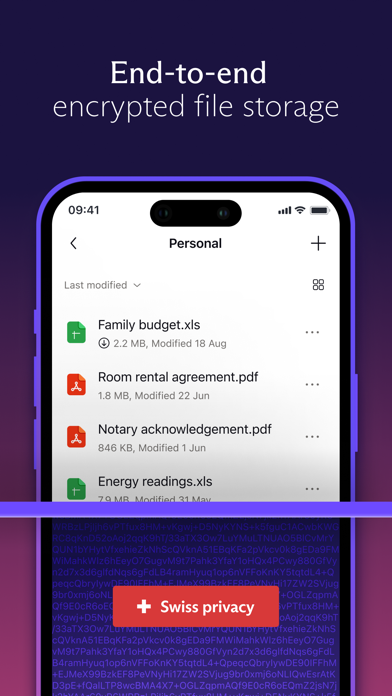
1. No one else can access them. • Zero-access encryption: All files are stored in encrypted format — not even Proton can read your files. • Free storage space: Get started with a free plan that comes with up to 1 GB of storage. • Swiss privacy and neutrality: Your data is protected by the Swiss data privacy laws, some of the strongest in the world. • Open-source cryptography: Anyone can check our code, and it has been audited by third-party professionals so you can know it's secure. • Mission-driven: Proton believes privacy is a human right.
ダウンロード Proton Drive: Cloud Storage わずか4ステップでapk: ↲
下記のダウンロードミラーを使用して、今すぐこれを行うことができます。 その 99%の動作保証 。 ファイルをコンピュータにダウンロードする場合は、必ずそれをあなたのAndroidデバイスに移動してください
をインストールする Proton Drive: Cloud Storage, サードパーティのアプリが現在インストールソースとして有効になっていることを確認する必要があります。 [メニュー]> [設定]> [セキュリティ]> []をクリックし、[不明なソース]をオンにして、Google Playストア以外のソースからアプリをインストールできるようにします。
あなたは今見つける必要があるでしょう Proton Drive: Cloud Storage ダウンロードしたファイル.
あなたがいったん見つけたら、 Proton Drive: Cloud Storage ファイルをクリックしてクリックすると、通常のインストールプロセスが開始されます。 何かを求められたら、 [はい] をタップします。 ただし、画面上のすべてのプロンプトを必ず読んでください。.
Proton Drive: Cloud Storage があなたの携帯にインストールされました。 楽しむ!
Proton Drive provides private and secure storage for your files and photos. With Proton Drive you can protect important documents, automatically back up cherished memories, and access your content across devices. All Proton Drive accounts come with 5 GB of free storage and you can upgrade to up to 1 TB of storage at any time. Trusted by over 100 million users, Proton Drive gives you an end-to-end encrypted vault where only you—and the people you choose—can access your files and photos. Proton Drive features: - Secure storage - Get 5 GB of free encrypted cloud storage with no file size limits. - Share content using secure links with password and expiration settings. - Keep your files and photos safe with PIN or biometric protection. - Access important files and photos even if your device is lost or damaged. Easy to use - Automatically back up photos and videos in their original quality. - Rename, move, and delete your personal files securely within the app. - Create, edit and collaborate on docs. - View your important files and memories – even when offline. - Restore files with version history. Advanced privacy - Stay private with end-to-end encryption – even Proton can’t view your content. - Secure your metadata, including filenames, sizes, and modification dates. - Protect your content with Swiss privacy laws, the strongest in the world. - Trust in our open-source code that is public and verified by experts. Secure up to 5 GB of free storage for your personal files, photos, and videos with Proton Drive. Stay ahead with our releases and updates by connecting with us! - LinkedIn: https://www.linkedin.com/company/protonprivacy - Instagram: https://www.instagram.com/protonprivacy/ - X/Twitter: https://x.com/ProtonDrive - Reddit: https://www.reddit.com/r/ProtonDrive/ Terms of Service: https://proton.me/legal/terms Privacy Policy: https://proton.me/legal/privacy

ChatGPT 4.68966
|

Google ドライブ - 安全なオンライン ストレージ 4.59664
|

TimeTree タイムツリー - カレンダーや予定表の共有 4.62312
|

Microsoft Outlook 4.54485
|

Google Gemini 4.59733
|

シフトボード:バイトの給料計算とシフト管理 4.68675
|

Microsoft Word 4.51521
|

Microsoft Excel 4.43548
|

QR・バーコードリーダー ポイント貯まるアプリ アイコニット 4.37619
|

シンプルカレンダー - スケジュール帳、予定表かれんだー管理 4.59504
|

Proton Mail - 暗号化メール 4.41138
|

Proton VPN - 安全な高速接続 4.33118
|

Proton Calendar: Secure Events 3.775
|
Proton Drive: Cloud Storage 4.08333
|

Proton Pass - Password Manager 4.82667
|